Showing posts with label Computer Organization. Show all posts

Tuesday, 29 September 2015

File System Interface In Operating System Ppt/Pdf/Ebook Download

File System Interface

  • File Concept
  • Access Methods
  • Directory Structure
  • File System Mounting
  • File Sharing
  • Protection

File Concept


  • Contiguous logical address space

Types:

  • Data
  1. numeric
  2. character
  3. binary
  • Program

File Structure


  • None - sequence of words, bytes
  • Simple record structure
  1. Lines 
  2. Fixed length
  3. Variable length
  • Complex Structures
  1. Formatted document
  2. Relocatable load file 
  • Can simulate last two with first method by inserting appropriate control characters
  • Who decides:
  1. Operating system
  2. Program

File Attributes

Name: only information kept in human-readable form.

Type: needed for systems that support different types.

Location: pointer to file location on device

Size: current file size

Protection: controls who can do reading, writing, execution.

Time, date, and user identification:data for protection, security, and usage monitoring

Information about files are kept in the directory structure, which is maintained on the disk

File Operations

Create
Write
Read
File seek – reposition within file
Delete
Truncate
Open(Fi) – search the directory structure on disk for entry Fi, and move the content of entry to memory
Close (Fi) – move the content of entry Fi in memory to directory structure on disk

Open Files:

Several pieces of data are needed to manage open files:
  1. File pointer:  pointer to last read/write location, per process that has the file open
  2. File-open count: counter of number of times a file is open – to allow removal of data from open-file table when last processes closes it
  3. Disk location of the file: cache of data access information
  4. Access rights: per-process access mode information

Open File Locking:

  • Provided by some operating systems and file systems
  • Mediates access to a file
  • Mandatory or advisory
  1. Mandatory – access is denied depending on locks held and requested
  2. Advisory – processes can find status of locks and decide what to do

File Locking Example – Java API


import java.io.*;
import java.nio.channels.*;
public class LockingExample { 
public static final boolean EXCLUSIVE = false;
public static final boolean SHARED = true;
public static void main(String arsg[]) throws IOException { 
FileLock sharedLock = null;
FileLock exclusiveLock = null;
try { 
RandomAccessFile raf = new RandomAccessFile("file.txt", "rw");
// get the channel for the file
FileChannel ch = raf.getChannel();
// this locks the first half of the file - exclusive
exclusiveLock = ch.lock(0, raf.length()/2, EXCLUSIVE);
/** Now modify the data . . . */
// release the lock
exclusiveLock.release(); // this locks the second half of the file - shared

sharedLock = ch.lock(raf.length()/2+1, raf.length(), SHARED);

/** Now read the data . . . */
// release the lock
exclusiveLock.release();
} catch (java.io.IOException ioe) { 
System.err.println(ioe);
}finally { 
if (exclusiveLock != null)
exclusiveLock.release();
if (sharedLock != null)
sharedLock.release();
}
}
}


Copy the above code


File Types – Name, Extension

file type name extension

Access Methods:

Sequential Access:
                read next
write next 
reset
no read after last write
        (rewrite)

Direct Access:
read n
write n
position to n
read next
write next 
rewrite n
n = relative block number


Sequential-access File:
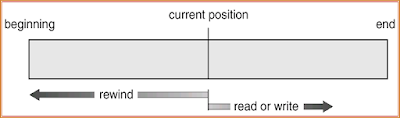
Sequential access File

Simulation of Sequential Access on a Direct-access File


Example of Index and Relative Files
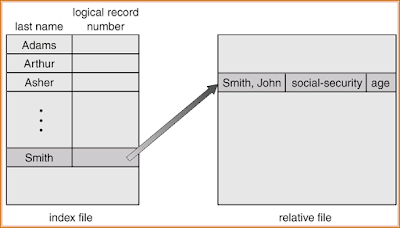
Example of Index and Relative Files

Directory Structure

A collection of nodes containing information about all files
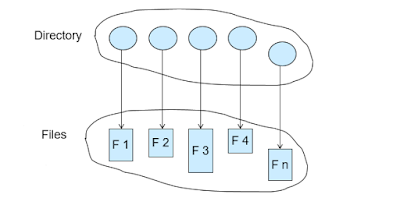
Directory Structure

Both the directory structure and the files reside on disk
Backups of these two structures are kept on tapes


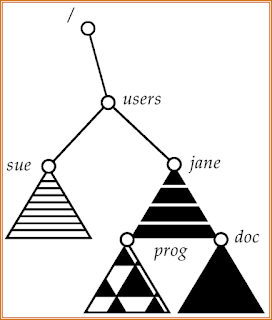
A Typical File-system Organization

A Typical File system Organization

Information in a Device Directory

  • Name 
  • Type
  • Address 
  • Current length
  • Maximum length
  • Date last accessed (for archival)
  • Date last updated (for dump)
  • Owner ID
  • Protection information (discuss later)

Operations Performed on Directory

  • Search for a file
  • Create a file
  • Delete a file
  • List a directory
  • Rename a file
  • Traverse the file system

Organize the Directory (Logically) to Obtain:

  • Efficiency – locating a file quickly
  • Naming – convenient to users
  1. Two users can have same name for different files
  2. The same file can have several different names
  • Grouping – logical grouping of files by properties, (e.g., all Java programs, all games, …)

Single-Level Directory

A single directory for all users
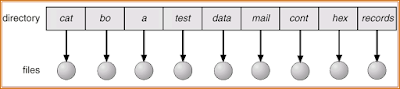
A single directory

Naming problem
Grouping problem

Two-Level Directory


Separate directory for each user
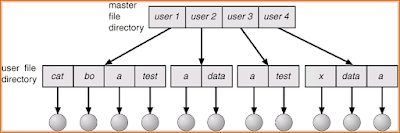

Two Level Directory

  • Path name
  • Can have the same file name for different user
  • Efficient searching
  • No grouping capability

Tree-Structured Directories

Tree Structured Directories

Efficient searching
Grouping Capability
Current directory (working directory)
  • cd /spell/mail/prog
  • type list
Absolute or relative path name
Creating a new file is done in current directory
Delete a file
rm <file-name>
Creating a new subdirectory is done in current directory
mkdir <dir-name>
Example:  if in current directory   /mail
mkdir count
Tree Structured Directories

Deleting “mail” deleting the entire subtree rooted by “mail”


Acyclic-Graph Directories:

Have shared subdirectories and files
Acyclic Graph Directories

Solutions:
  • Backpointers, so we can delete all pointers Variable size records a problem
  • Backpointers using a daisy chain organization
  • Entry-hold-count solution

General Graph Directory
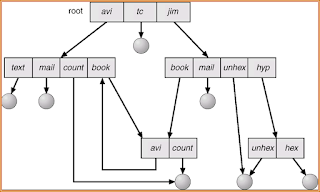
General Graph Directory

  • How do we guarantee no cycles?
  1. Allow only links to file not subdirectories
  2. Garbage collection
  3. Every time a new link is added use a cycle detection algorithm to determine whether it is OK

File System Mounting

  • A file system must be mounted before it can be accessed
  • A unmounted file system is mounted at a mount point
(a) Existing.  (b) Unmounted Partition
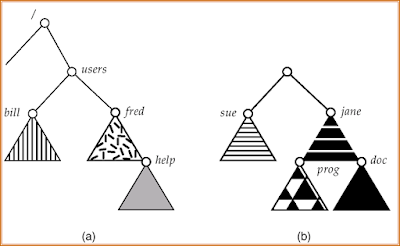
file system mounting

Mount Point

Mount Point

File Sharing

  1. Sharing of files on multi-user systems is desirable
  2. Sharing may be done through a protection scheme
  3. On distributed systems, files may be shared across a network
  4. Network File System (NFS) is a common distributed file-sharing method
File Sharing – Multiple Users

User IDs identify users, allowing permissions and protections to be per-user
Group IDs allow users to be in groups, permitting group access rights

File Sharing – Remote File Systems

  • Uses networking to allow file system access between systems
  1. Manually via programs like FTP
  2. Automatically, seamlessly using distributed file systems
  3. Semi automatically via the world wide web
Client-server model allows clients to mount remote file systems from servers

  • Server can serve multiple clients
  • Client and user-on-client identification is insecure or complicated
  • NFS is standard UNIX client-server file sharing protocol
  • CIFS is standard Windows protocol
  • Standard operating system file calls are translated into remote calls

Distributed Information Systems (distributed naming services) such as LDAP, DNS, NIS implement unified access to information needed for remote computing

File Sharing – Failure Modes

  • Remote file systems add new failure modes, due to network failure, server failure
  • Recovery from failure can involve state information about status of each remote request
  • Stateless protocols such as NFS include all information in each request, allowing easy recovery but less security

File Sharing – Consistency Semantics

Consistency semantics specify how multiple users are to access a shared file simultaneously
  • Similar to Ch 7 process synchronization algorithms
  • Tend to be less complex due to disk I/O and network latency (for remote file systems
  • Andrew File System (AFS) implemented complex remote file sharing semantics
  • Unix file system (UFS) implements:
  • Writes to an open file visible immediately to other users of the same open file
  • Sharing file pointer to allow multiple users to read and write concurrently
  • AFS has session semantics
  • Writes only visible to sessions starting after the file is closed

Protection

File owner/creator should be able to control:
  • what can be done
  • by whom
Types of access Read
  1. Write
  2. Execute
  3. Append
  4. Delete
  5. List

Access Lists and Groups

Mode of access:  read, write, execute
Three classes of users

Ask manager to create a group (unique name), say G, and add some users to the group.
For a particular file (say game) or subdirectory, define an appropriate access.
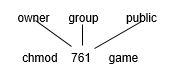
access list and groups


Your questions and feedback is valuable to us and we will be more than happy to answer your queries. Like our Facebook Page.

More related posts:
1) Linkers and loaders 
2)Two pass assemblers 
Linkers, Loaders and Software

Linkers  Loaders  Software


Linkers and Loaders:

Basic loaders functions, central loaders scheme, absolute loaders, Subroutine linkers, relocation loader, Direct linking loader, Dynamic linking loader,

Design of absolute loaders and direct linking loader

Software tools: Software tools for program development, editors, debug monitor, programming environment, user interfaces.


Software Tools for program Development

Software tools are used extensively for program development and user interfaces
  • Editor
  • Debug monitor
  • Programming Environment
  • User Interfaces
Editor
Editor is computer program that allows a user to create and revise target document

Document includes object as computer programs, text, equations, tables, diagrams, lines and photographs.

The document editing process is an interactive user-computer dialogue

1.Select the part  to view and manipulate
2.To determine the format of and display
3.Specify and execute operation

4.Update the view appropriately

Text editor are of following types
  1. Line Editors
  2. Sreen Editors
  3. Word processors
  4. Structure Editiors

Line Editors

  • Text editor are of following types
  • It is primitive form of editor
  • User has to specify line to change text
  • Interaction with the editors is through a set of commands , this makes a editor less user friendly
  • E.g. VI editor, VIM editor

Screen Editors


  • Screen editors enables to modify any text by moving cursor to desired location.
  • This is very useful while formatting the text to produce printed document
  • E.g. office document.

Word processor

  • A word processor recognize word a basic entity
  • It support spell check option
  • It has following options
1.Moving a section of text from one place to another
2.Delecting a section of text
3.Searching a word
4.Merging of text
5.Replacement of word
6.Spell-Check

Structure Editors

  • A structure editor has awareness of structure of document.
  • A structure is specified by user while creating and modifying the document.
  • E.g.   LatTex

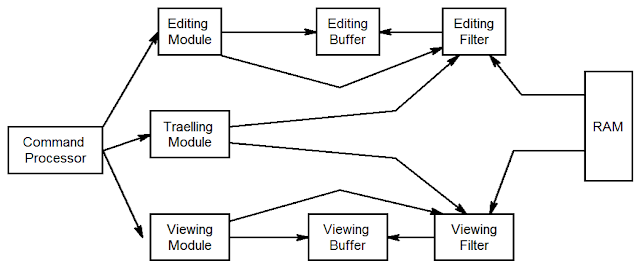
Editor Structure

structure of an editor

  • Editing module is collection of module deling with editing tasks.
  • Travelling module of editor performs the setting of the current editing and viewing pointers
  • In viewing module start of the area to be view is determine by current viewing pointer

Debug Monitor

  • Debug monitor provides following facilities
  1. Setting breakpoints in the program
  2. Initiating a debug conversation
  3. Displaying values of variables
  4. Assigning new values to variable
  • Debugging system provides functions such as tracing and trackback.
  • Tracking used to track the flow of execution logic and data modification
  • Trackback can show path by which the current statement reached
  • In debugging user specifies breakpoints and action to be performed

Programming Environment

  • Programming environment is an integrated program development environment
  • It has following facilities
  1. Program creation
  2. Editing
  3. Execution
  4. Testing and debugging
Programming Environment has following components 
     1. A syntax directed editor
     2.Compiler ,Interpreter
     3.Debug monitor
     4.Dialog monitor

User Interfaces

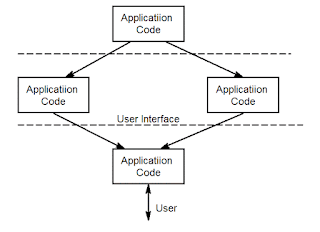
  • A user interface plays an important role in simplifying the interaction of user with application
  • UI functioning has two important aspects
  1.  Issuing Commands
  2.  Excange of data 
working of user interface

  • The presentation manger is responsible for managing user’s screen and for accepting data
  • The dialog manager is responsible for interpreting user command and implement them
  • Dialog manger is also responsible for  error message

More related posts:
1) Deadlock

 2)Two pass assemblers 

Friday, 25 September 2015

What Is A Loader?

LOADER


Definition of Loader:

  1. Loader is a system program which is responsible for preparing the object file to start the execution.
  2. Once the assembler produces an object program,that program must be placed into memory and executed. It is the purpose of the loaders is to assure that object programs are placed into an executable form.
Functions of Loader:
1.  Allocation 
  • Allocates space in memory for the program.
  • In case of Absolute ALP allocation is done by programmer.
  • In case of  Relocatable ALP allocation is done by loader.
2. Linking
  • Resolve symbolic references between objects.
  • In case of Absolute ALP linking is done by programmer since,
  • programmer is aware of runtime address of all symbols.
  • In case of  Re locatable  ALP allocation is done by loader and hence assembler must provide the location at which linking is to be done.
3. Relocation
  • Adjust all address dependant locations,such as address constant to correspond to the allocated space.
  • In case of Absolute ALP this is done by assembler. In case of Relocatable ALP this is done by loader.
4. Loading
  • Placing the object program into its assign memory location.
  • In both the cases this is done by the Loader.
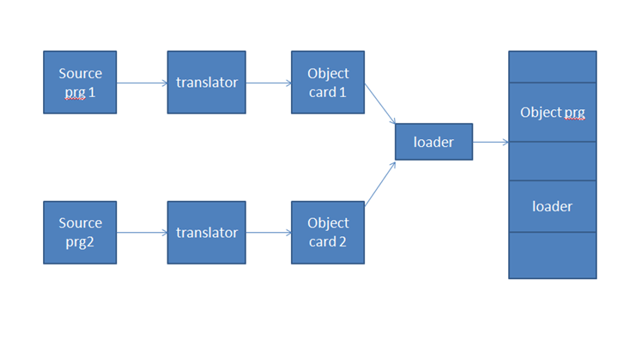
General Loading Scheme:
general loading scheme

  1. In this, source program is translated into object program using assembler.
  2. Then it is loaded into main memory along with source code of loader.
  3. Size of loader is smaller than assembler code  therefore , more  space is available for the object program.
Disadvantage
We have to store source code of loader.


Absolute Loader:
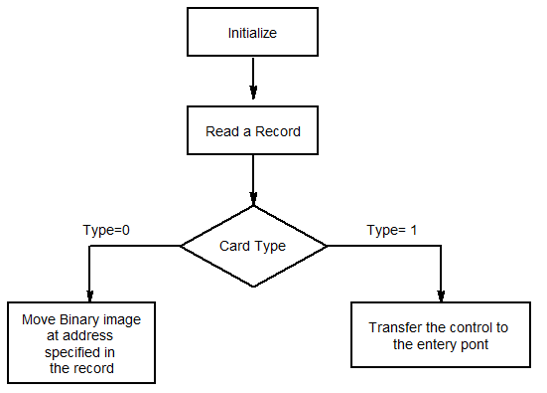
  • The absolute loader reads the object program line by line and moves the text of the program into memory.
  • Object program has
  1. Machine instruction with memory address
  2. Starting of execution point
 It requires 2 types of  records
i ) Text Card
It contains binary image of assembly program
ii) Transfer Card
It contains starting point execution.
 
1)TXT Card:
TXT card
 
Card Type: It indicate which type of card
0 for Text card.
1 for Transfer card.
2.Count: It indicates amount of information which is to be loaded.
3.Address: It indicates location at which information is to be loaded.
4 Content: It indicates binary information which is to be loaded.

Transfer Card:
Transfer Card: It is used to indicate where to be load the program
Card type is 1.
Count is always 0.
Address: It indicate location from where execution of object program should begin.
Content: It always kept blank.

 
Algorithm

algorithm transefer card  
 
Bootstrap Loader
  1. Program residing in EPROM,ROM or other non-volatile memory
  2. Automatically executed by the processor
  3. Reads the hard disk drives boot sector to continue the process of loading the computer OS
Function of Bootstrap Loader: 
  1. Enable the user to select the OS to start
  2. Loading the OS file from the boot partition
  3. Controlling the OS selection process and hardware detection prior to kernel initialization.
 DLL : Direct Linking Loader
  1.  It is Relocatable type of loader.
  2. It has advantage of allowing programmer with multiple procedure segments and giving them complete freedom of referring data contained in some other segment.
  3. Input to the loader is set of object programs to be linked together
  4. This provides flexible Intersegment Referencing, for doing all this, DLL required following modules.
    1.  ESD-External Symbol Directory
    2. TXT-Actual assembled program
    3. RLD-Relocation and Linkage directory module
    4. END-End module


1:ESD-External Symbol Directory

ESD card contains information about all symbols that are define in a program that may be referred somewhere else and vice versa.
There are  3 types of symbols
  1. Segment Definition (SD):-It is name of the program which return prior to start keyword.
  2. Local Definition (LD):-This are the symbols which are define in the program.External
  3. Reference(ER):- This are symbols which are referred in the program but are defining somewhere else.
ID: - Giving unique no. to all segment definition and external reference.
Relative Address:- It is address at which those symbols are define.
Length: - Size of the symbol.

2. TXT Card
TXT card
Text portion of object module contains the relocatable machine language instruction and data that were produced during translation.

RLD (Relocation and Linkage Directory card)

It contains information about those location of the program whose contains depend on address at which the program is placed.
It contains following information:
  1. The address of each operand that needs to be changed due to relocation
  2. By what it has to changed
  3. The operation to be performed
End Card


It specifies that start of execute of the of the object program and end of object module.


Design of DLL (Direct Linking Loader) :
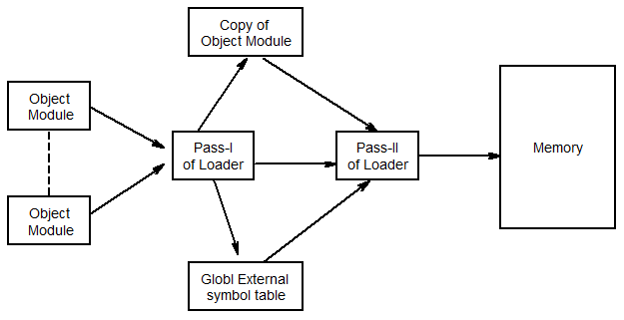
  • Direct linking loader requires two passes to complete the linking process
  • Pass-I assigns address to all external symbol
  • Pass-II performs actual loading ,relocation and linking
In pass-I global external symbol table is prepared which has external symbol and corresponding absolute address value.

Two Pass Loader scheme 

Two Pass Loader scheme


Pass1 Database
1. Object card: - This card contain object program in four cards.
i. ESD
ii. TXT
iii. RLD
iv. END

IPLA (Initial program Local Address):-It is the address obtained by loader from operating system.
 

GEST (Global External Symbol Table):- It is used to keep track of addresses that are assign to the symbol.
Copy file:- it is preferred by pass1 to be used by pass2.
Load Map:- It is printed listing of GEST table.

 Pass2 Database
Copy file:- it is preferred by pass1 to be used by pass2
 

IPLA (Initial program Local Address):-It is the address obtained by loader from operating system.
 

Execution Address (EXADDR):- It indicates the location from where the execution of object program should begin.
 

GEST (Global External Symbol Table):- It is used to keep track of addresses that are assigning to the symbol.
 

Local External Symbol Array(LESA):- It is prepared with the help of  ESD And GEST.

Monday, 21 September 2015

Data Structures For Language Processing (System Programming/Search Organization/Hash Table/Heap)

Data structures for Language processing

What are language processors?
Basically language processors are the programs that process the program that is written in programming language i.e normal programs which we generally write such as assemble level, c programming etc.

The next stage is of language translator whose basic function is to translate the program from source language to machine language or some other basic language. The machine code can be for an actual computer or for a virtual (hypothetical) computer. If it is for a virtual computer, then a simulator for the virtual computer is needed in order to execute the translated program. 

Source program components are first translated into machine language to produce components called object modules or object files.  

Program components in languages such as C are normally compiled into object files, which are combined into an executable file by a linkage editor or linking loader. The linkage editor adjusts addresses as needed when it combines the object modules, and it also puts in the addresses where a module references a location in another module (such as for a function call).
 
Agenda

  • Classification
  • Search Data Structure
    •  Fixed Size Record
    • Variable Size Record
    • Hybrid Record 
  • Other Organization
    •  Tree Representation
    • Hashed Representation
     
  • Allocation Data Structure
    • Stack & Extended Stack
    • Heap
     
Classification

1. Based on nature ---- Linear and Non-linear
 eg :- Linear = array , stack etc.
         Non-Linear = Tree , Graph etc.

2. Based on Purpose --- Search and allocation
eg :- Search = Binary search tree
      allocation = stacks,heaps

3.Based on Lifetime ---- whether used during Language Processing or during target program executions
 eg :- Lang. Processing = Object based data model
        Target program = Hash tables


Search Data Structures

A Search data structure (or search structure ) is a set of entries accommodating the information concerning one entity. Each entity is assumed to contain a key field which forms the basis for search .
 

  1. Fixed Size Record
  2. Variable Size Record
  3. Hybrid Record
Fixed Size Record

Each entry has same type and size
Eg Array


Variable Size Record
Type and size of each record could be different


Hybrid Record
Entry has both fixed length part and variable length part


Entry Format


Generic Search Procedure for locating the entry of symbol


Binary Search Organization


Hash Tables

Interview Guide and how to face interview


Hashing Function


  • Hashing function is used to make search system faster.
  • It transforms the source symbol or group of symbols to numerical numbers to make faster comparisons and searching
  • Hashing do not change the original meaning of symbols it just transforms them to other form.
  • Size is pre decided for transforming message to particular format
  • If message is of less size than that size , it performs “folding” operation
  • In folding message is padded with 0’s to complete the size of it. 

Properties of good hashing function


Collision in hashing
Many function result into same number generation which leads to collision of numbers and searching will crash

Thus to avoid collision we have various collision handling techniques

1. Rehasing technique
2. Overflow chaining technique


Allocation Data Structure


Important Allocation Data Structures
  • Stack & Extended Stack
  • Heap
Stacks


Extended Stack model

  • An extended stack is needed for handling a variable length record . A record consists of a set of consecutive stack entries
  • In addition to base and top a new pointer Previous is used.

Heaps


Use of Heap in Memory management
  
  • Due to repetition of allocation and deallocation of memory area holes are created in memory area.
  • Memory management takes care of this holes and reallocate this area by managing it properly
  • It increases performance and speed of allocation and deallocation of memory spaces

 More related posts:
1) Deadlock

 2)Two pass assemblers 

Saturday, 19 September 2015

Language Processors (The Interpreter) System Programing

Language Processors


Introduction

    1.Language processing activities arise due to the differences between the manner in which a software designer describes the ideas concerning the behavior of software and the manner in which these ideas are implemented in computer system.
     2.The designer expresses the ideas in terms related to the application domain of the software.

     3.To implement these ideas, their description has to be interpreted in terms related to the execution domain.

Semantic Gap


The term semantics to represent the rules of meaning of a domain, and the term semantic gap to represent difference between the semantics of two domains.


The semantic gap has many consequences, some of the important are

  1. Large development times
  2. Large development effort
  3. Poor quality software.

Key Software engineering steps


  1. Specification and design of an application program, followed by its coding in a programming language Execution of the program with the help of language processor
  2. An Application program written in a programming language is governed by semantics of a programming language.
  3. Thus use of programming language has introduces a new domain, programming language domain PL Domain.

 Specification and execution Gap

Difference between specification gap and execution gap

Specification Gap:

Semantic gap between two specification of the same task

Execution Gap:

Semantic gap between the semantics of programs that performs the same task but written in different programming languages.


Problem and procedure oriented programming languages

Problem oriented programming languages:
Lets a user specify a computation using data and operation that are meaningful in the area of the computation

 
Procedure oriented programming languages:
It provides some standard methods of creating data and performing operations and lets the user describe the intended computation by using them
 
 
Language Processors
  •  A language processor is software which bridge a specification or execution gap.


Language processor abandons generation of target program if it detects error in the source program 
Different Types of Language Processors:
  1. A Language Translator
  2. De-translator
  3. Preprocessor 
  4. Language migrator
Language translator:
bridges an execution gap between PL, and the machine language of a computer. 
De-translator
Bridges the same execution gap as the language translator but in the opposite direction
  Preprocessor
  Bridges an execution gap but is not a language translator
  Language Migrator
  Bridges specification gap between two programming languages
Example: Preprocessor and Translator 
 

Interpreter


An interpreter is language processor which bridges an execution gap without generating a machine language program that means the execution gap vanishes totally.


Fundamental activities divided into those that bridge the specification gap and execution gap.

  • Program generation activities
  • Program execution activities
Program Generation:
  1. A program generation activity aims at automatic generation of a program.
  2. A source language is a specification language of an application domain and the target language is procedure oriented PL.
  3. Program generator introduces a new domain between the application and PL domain, call this the program generator domain.
  4. Specification gap now between Application domain and program generation domain, reduction in the specification gap increases the reliability of the generated program.
 

Also read GATE MCQ's
There are 2 popular models of program execution


1.Program Translation
2.Program Interpretation

Lets us know briefly about these two,

Program Translation:The program translation model bridges the execution gap by translating a sources program into program in the machine or assembly language of the computer system, called target program. 


Characteristics of the program translation model:
  1. A program must be translated before it can be executed
  2. The translated program may be saved in a file. The saved program may be executed repeatedly.
  3. A program must be retranslated following modifications.


Program Interpretation: during interpretation interpreter takes source program statement, determines its meaning and performs actions which implement it.


The function of an interpreter is same as the execution of machine language program by CPU.  


 Characteristics:
  1. The source program is retained in the source form itself, no target program form exists,
  2. A statement is analyzed during its interpretation.


 Comparison

  1.  In translator whole program is translated into target and if modified the source program, whole source program is translated irrespective to size of modification.
  2. That not the in case of interpreter, interpretation is slower than execution of m/c language program. 

Entc Engg. Powered by Blogger.